Review and List of the Top PDF Editors with Features, Comparison, and Pricing. Select the Best PDF Editor From This List Based on Your Requirements:
PDF Editor is the application that provides the features and functionalities such as editing, converting, merging, and splitting PDF documents, to work on PDF documents.
PDF is popular among businesses because of its feature to maintain the same formatting regardless of operating system and hardware. So, businesses often require PDF editing software to create or revise PDF files. The best editor will help the business with editing text, images, and graphics.
Various free PDF Editing Software tools are available in the market. These free PDF editors come with limitations that should also be considered while selecting the tool.
The free PDF editing software will be the best solution if it fits your requirements in terms of features and the limitations on editing the number of pages.

PDFelement has researched and compared the performances of PDF editing tools. In the below image you can see Adobe Acrobat Pro DC, PDFelement, Nuance Power PDF, and Nitro are the top-performing PDF editing tools.

Suggested read =>> Error PDF Not Opening In Chrome Browser: [Solved]
Also read =>> How To Merge PDF Files Into A Single Document
Table of Contents:
- List of PDF Editor Software
- Comparing the Best Free PDF Editors
- #1) WPS Office
- #2) pdfFiller
- #3) Systweak PDF Editor software
- #4) Qoppa PDF Studio
- #5) PDFelement
- #6) Adobe Acrobat Pro DC
- #7) Ashampoo® PDF Pro 2
- #8) LightPDF
- #9) PDF Agile
- #10) Wise PDF Editor
- #11) Nitro Pro
- #12) Foxit PhantomPDF
- #13) Nuance Power PDF
- #14) Sejda PDF Editor
- #15) PDFescape
- #16) iSkysoft PDF Editor
- #17) AbleWord
- #18) PDF Expert
- #19) SmallPDF
- #20) EasePDF
- #21) PDFLiner
- #22) WorkInTool PDF
- #23) PDFSimpli
- #24) Xodo
- #25) DocHub
- Conclusion
List of PDF Editor Software
- WPS Office
- pdfFiller
- Systweak PDF Editor software
- Qoppa PDF Studio
- PDFelement
- Adobe Acrobat Pro DC
- Ashampoo® PDF Pro 2
- LightPDF
- PDF Agile
- Wise PDF Editor
- Nitro Pro
- Foxit PhantomPDF
- Nuance Power PDF
- Sejda PDF Editor
- PDFescape
- iSkysoft PDF Edit
- AbleWord
- PDF Expert
- Smallpdf
- EasePDF
- PDFLiner
- WorkInTool PDF
- PDFSimpli
- Xodo
- DocHub
Comparing the Best Free PDF Editors
| PDF Editors | Platforms | Output Formats | Conversion Speed | Free Trial | Price |
|---|---|---|---|---|---|
WPS Office | Windows, Mac, Linux, Android, iOS | DOC, DOCX, XLS, XLSX, PPT, PPTX, PDF, and many more | Fast | 7-day free trial | Free |
pdfFiller | Web-based, Android, iOS. | Word, Excel, PPT, JPG | — | Available | Basic plan: $8 per month, Plus Plan: $12 per month, Premium Plan: $15 per month. Billed Annually. |
Systweak PDF Editor software | Windows | DOC, PPT, Excel, Images | Fast | 60 day money back guarantee. | $41.97/year and $67.46 for lifetime plan. |
Qoppa PDF Studio | Windows, Mac, Linux. | Text, Images, HTML5/SVG, etc. | — | Available | Standard: $99 for 1 copy Pro: $129 for 1 copy |
Adobe Acrobat Pro DC | Windows, Mac, iOS, & Android. | Word, Excel, PowerPoint, Jpg, PNG, TIFF, RTF. | More than 2 minutes for converting 100 pages. | Available | Acrobat Pro DC: $14.99/month Acrobat Standard DC: $12.99 Acrobat DC for teams: $16.14/seat/month. |
PDFelement | Windows, Mac, iOS, and Android. | Word Excel, PowerPoint, JPG, PNG, HTML, Text, GIF, TIFF, BMP, RTF, EPUB, HWP, and HWPX. | 1 minute for converting 100 pages. | Available | Individuals: Start at $59/year Team: Start at $109 per user per year. |
Ashampoo® PDF Pro 2 | Windows 10, 8, and 7. | PDF, Word, etc. | — | Available | $29.99 for 3 PCs for home use |
LightPDF | Windows, Mac, iOS, Android, Web. | Word, PPT, Excel, TXT, PNG, JPG. | — | Free web-based edition available. | Personal: $19.90 per month and $59.90 per year, Business: $79.95 per year and $129.90 per year. |
PDF Agile | Windows, Online (converter) | Word, Excel, PowerPoint, TXT, JPG, PNG, BMP, and can also convert files to DWG and DXF. | More than 2 minutes for converting 100 pages. | Free plan available | $39/half year and $59/year. |
Wise PDF Editor | Windows | Word, Excel, PPT, JPG, TXT, HTML. | — | Free to download and use with limited capabilities. | Starts at $ 19/month |
Nitro Pro | Windows | Word, Excel, PowerPoint, JPG, PNG, TIFF, RTF, and Text. | More than 2 minutes for converting 100 pages | Available | Basic: $128/user, Team: Get a quote, Enterprise: Get a quote. |
Foxit PhantomPDF | Windows & Mac. | Word, Excel, PowerPoint, Text, Image, HTML. | More than 2 minutes for converting 100 pages. | Free trial for 14 days. | PhantomPDF Business 9: $159 and PhantomPDF Standard 9: $129 |
Nuance Power PDF | Windows | Word Excel, PowerPoint, and Corel WordPerfect, | — | — | Starts at $89.99 |
DocHub | Web-based | Word, TCT, HTML, CSV, PPT, RTF, PNG. | — | 30 days | Free to download. Pro version costs $14/month. |
#1) WPS Office
Best for WPS Office is ideal for students, professionals, small businesses, and home users alike.
Price:
- Free version: Basic document editing
- Premium version: Pricing varies by region and subscription plan. Visit official website for details.
Features:
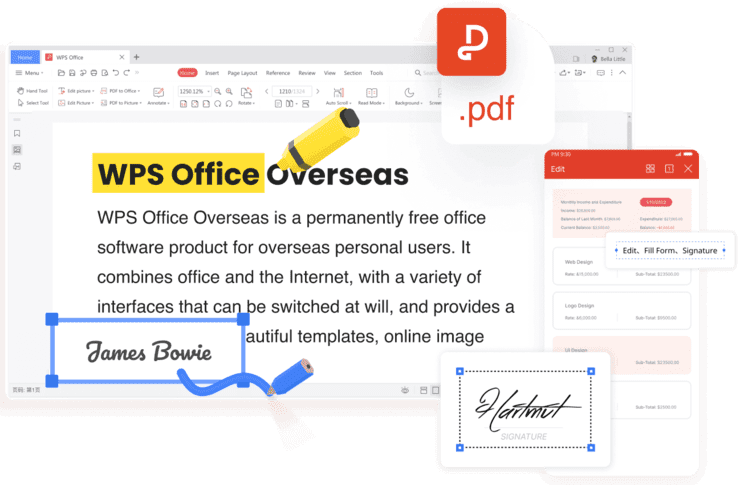
WPS Office is a versatile office suite featuring a Word Processor, Presentation software, Spreadsheet tool, and PDF editor. It offers cloud integration, pre-designed templates, and real-time collaboration. Compatible across platforms, it’s lightweight, available in multiple languages, and accessible on mobile. One of the outstanding features of WPS Office is the PDF tool:
- PDF AI and OCR PDF: Utilizes advanced AI for intelligent document processing and Optical Character Recognition (OCR) for accurate text extraction from scanned PDFs. This enhances document accessibility and searchability.
- PDF Form Fill: Automatically detects filling areas upon file opening, significantly enhancing form-filling efficiency.
- PDF Signing: Enables certificate-based signing, ensuring the integrity of CA certification. This extra layer of security safeguards confidential documents during network transmission, allowing for safe and dependable use of signed PDFs in inter-enterprise electronic document exchange and contract signing.
- PDF Conversion: Seamlessly converts to high-quality Word, Excel, PowerPoint, and images while preserving the original format. No loss of formatting occurs during the process.
Verdict: The PDF functionalities in WPS Office have transformed the way I work. Its powerful AI makes proofreading a breeze, catching grammar errors and providing style suggestions effortlessly. The smart document formatting feature has saved me valuable time on tedious tasks.
It’s like having a virtual assistant right within my office suite! I highly recommend it to anyone looking to supercharge their productivity, particularly when it comes to working with PDFs.
#2) pdfFiller
Best for End-to-end PDF document management.
Price: Basic plan: $8 per month, Plus Plan: $12 per month, Premium Plan: $15 per month. All plans are billed annually. A 30-day free trial is also available.

pdfFiller should be your go-to destination to get all sorts of processing work done on your PDF document. This is one such software that allows you to create, edit, and manage a PDF file via a single comprehensive online platform. You can also use this platform to convert PDF files into editable documents.
Its home page makes the process of PDF document management easier by providing you with an ‘upload document’ option right. With a few clicks, you’ll be able to upload PDF or other types of files on the platform. You can then use any of the easy-to-use tools that PdfFiller grants you to go to work on your uploaded document.
Features:
- Convert or Compress PDF Files
- Split or Merge PDF Files
- View and Edit PDF Files
- Add digital signature
- OCR
Verdict: From creating PDF files from scratch to editing them by adding text and other graphical elements, pdfFiller serves as a single solution that answers to all the problems one can have while managing PDF files. With a 30-day free trial to boast, this one is definitely worth trying.
#3) Systweak PDF Editor software
Best for End-to-end PDF editing.
Price: Systweak’s annual plan will cost you $41.97 whereas its lifetime plan will cost you $67.46. You can download and use the tool for free with limited capabilities.
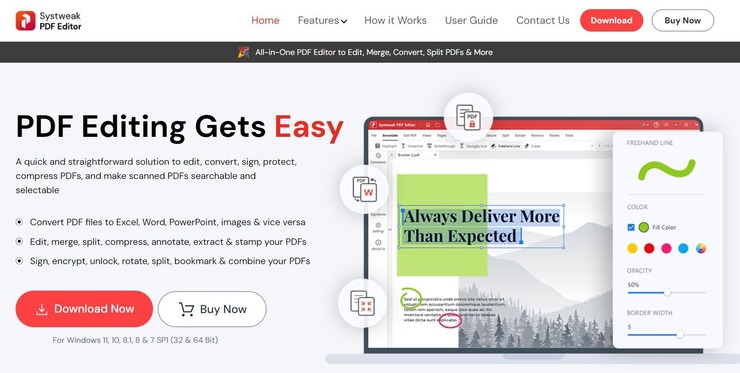
With Systweak, you get a PDF processing tool for Windows that can do a lot more than simple editing. This software’s editing capabilities are quite advanced, allowing you to add text, notes, reorganize, rotate pages, and even sign a PDF in just a couple of easy steps. You can also use the software to easily merge or split a PDF file in a single click.
Besides editing, you can also rely on Systweak to covert a PDF file into a wide range of output formats. This include Excel, Word, PPT, images, and much more. The software can also be used to compress a PDF file or encrypt it as well.
Features:
- Merge or split PDF file
- Compress or Convert PDF File
- Sign PDF
- Optical Character Recognition
- Annotate PDF
- Encrypt a PDF
Verdict: Systweak is an all-in-one PDF processing tool that performs a ton of tasks with phenomenal finesse. From conversion to compression, from merging to splitting, you can work on your PDF files in multiple useful and interesting ways with Systweak.
#4) Qoppa PDF Studio
Best for being a PDF Editor that can be used across most computing platforms such as Windows, macOS, Linux, and more.
Price: $99 One-Time Fee for 2 computers. Volume, Education & Non-Profit Discount available.

An easy-to-use, full-featured PDF editing software that is a reliable alternative to Adobe® Acrobat® and provides all PDF functions needed at a fraction of the cost. PDF Studio maintains full compatibility with the PDF Standard.
Features:
- Create, Upload, or Scan to PDF
- Annotate and Markup PDFs
- Convert From Multiple Formats
- Create & Fill Forms
- Merge & Split
- Secure PDFs
- Batch Processing
- OCR (Make PDF Searchable)
Verdict: This powerful PDF editor allows you to easily create, scan or convert documents to PDF as well as markup and edit existing PDFs.
At a fraction of the price as Adobe® Acrobat®, it also comes with very advanced features such as permanent redaction, imposition, file size reduction, preflight and even page resize! This editor can be used on multiple computing platforms such as Windows, macOS, Linux.
#5) PDFelement
Best for offering good features and functionalities to edit PDFs and add forms.
Price: It has two pricing plans for individuals i.e. PDF element Pro ($79 per year) and PDFelement Standard ($59 per year). For teams, PDFelement Pro is available for $109 per user per year. You can get a quote for PDFelement Business.

Also read =>> How To Edit A PDF File
PDFelement is the easy-to-use tool for creating, editing, converting, and signing PDF documents. It supports Windows and Mac platforms. It is available in three solutions, PDFelement Standard, PDFelement Pro, and PDFelement Business. The mobile app is available for iOS and Android devices.
Features:
- PDFelement provides functionalities for converting scanned documents into editable PDFs.
- It has functionalities for creating PDFs, editing text & images in PDFs, securing & signing PDF files, converting PDFs, and filling out PDF forms.
- It can compress and optimize documents.
- It supports Optical Character Recognition (OCR).
- It provides features for adding a digital signature.
Verdict: PDFelement can help you with one-on-one technical support. It offers perpetual licensing and hence can be the perfect solution for individuals and enterprises.
#6) Adobe Acrobat Pro DC
Best for Adobe Acrobat Pro DC is the overall best solution for creating detailed PDFs and Forms.
Price: Adobe offers a free trial for Acrobat Pro DC. It offers two pricing plans for individuals, Acrobat Standard DC (For Windows only: $12.99 per month) and Acrobat Pro DC: (For Windows & Mac: $14.99 per month). For businesses, there are two plans Acrobat DC for teams ($16.14 per seat per month) and Acrobat DC for enterprise (Get a quote).

Adobe Acrobat Pro DC can be used on any device. It can convert PDFs to MS Office formats. Acrobat Pro DC can edit, create, export, organize and combine files on mobile devices. In a few simple and easy steps, you can share PDFs and gather comments.
Features:
- Adobe Acrobat Pro DC has functionalities for creating and editing PDFs.
- It has features for converting, sharing, and signing PDFs.
- Mobile App has functionalities to annotate, sign, and share PDFs.
Verdict: Adobe Acrobat Pro DC will let you digitally track the progress and automatically archive the signed document. As per reviews, it has a complex interface.
#7) Ashampoo® PDF Pro 2
Best for editing, converting, merging, and creating PDFs.
Price: It is available for $29.99. It is a one-time payment. For home use, it can be used on 3 systems but for commercial use, it requires one license per installation. Its free trial is available to download.

Ashampoo PDF Pro 2 is an all-in-one solution for managing and editing PDF documents. It has functionalities to create, edit, protect, convert, and merge the PDF. You can encrypt the document if required.
It has functionalities for splitting up the PDFs into smaller documents and you can give a custom number of pages. It supports Windows 10, 8, and 7 platforms.
Features:
- Ashampoo PDF Pro 2 has functionalities for comparing two PDFs side by side.
- Its snapshot function will let you capture the perfect screenshot of PDFs.
- It provides a new & simplified text formatting dialog.
- It contains the auto-repair feature.
- Its toolbar will show the recently used page operations.
Verdict: Ashampoo® PDF Pro 2 will help you to create the right size documents for any device. It provides backward compatibility by supporting PDF 1.4. With its new menu structure, it is easier to use.
#8) LightPDF
Best for Editing, Compressing, Converting, and Split/Merging PDF files.
Price: LightPDF offers 2 pricing plans. The personal plan will cost $19.90 per month and $59.90 per year. The business plan costs $79.95 per year and $129.90 per year.

With LightPDF, you get PDF software that can do everything you want a PDF editor to do and beyond. In just a few easy steps, you can use this software to edit your PDF file in a thousand ways. You can add and remove images, texts, and other elements from your PDF file. You can also annotate your PDF file, add a watermark to it, and highlight or redact content on it.
You can also completely transform the design layout of your PDF file using this software. The web-based version of this software is completely free to use. However, by paying a small reasonable fee, you can download this software for use on a Mac, Windows, Android, and iOS device.
Features:
- OCR to turn a PDF file editable
- High-quality PDF Compression
- Advanced PDF Editing Capabilities
- Convert PDF Files into multiple formats
- PDF Reader
Verdict: LightPDF is an all-in-one PDF editor that is free to use if you are only using its web version. Its desktop and mobile versions are still reasonably affordable and exceptional with regard to their PDF processing functionality. This one has our highest recommendation.
#9) PDF Agile
Best for PDF Agile is best for its PDF editor and converter.
Price: PDF Agile provides a free plan with limited features. Click to free download PDF Agile. In addition, it offers two pricing plans: PDF Agile Pro – $39 for 6 months and $59/year.
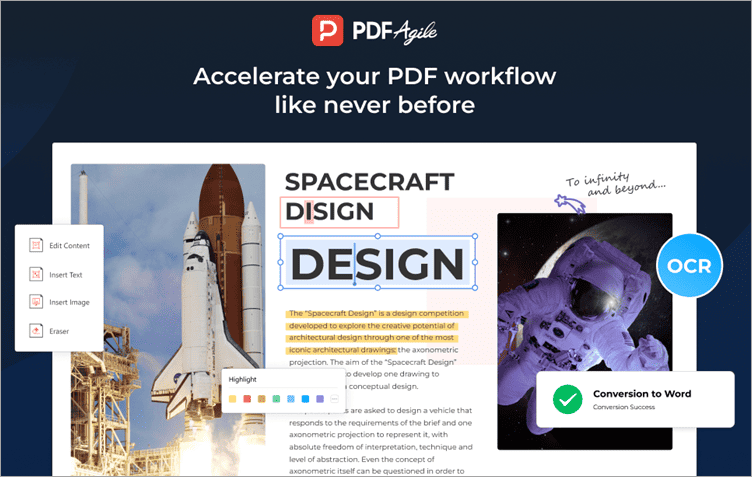
Designed with simplicity to make working with PDFs simple, fast, and practical, PDF Agile is a powerful PDF editor and converter that allows you to edit PDF documents, including scans, quickly and easily without going back to the source files.
In addition, PDF Agile is a fantastic program that aids in easy editing and conversion of PDF files into Word, Excel, PowerPoint, TXT, images, CAD, and vice versa while retaining the original formatting.
Features:
- Reduce the file size of the PDF without sacrificing quality.
- Page ranges can split a PDF into multiple files.
- OCR: text can be extracted from images or scanned PDF documents.
- Drag and drop page thumbnails to reorder PDF pages.
- Easily convert PDF files to Word, Excel, PowerPoint, TXT, images, CAD, and vice versa while retaining the original formatting.
- Instantly translate any text from one language to another in a PDF file and many more.
Verdict: PDF Agile is a fully-featured PDF editor and converter with a powerful full-text OCR engine. With many creative tools for editing, converting, merging, and compressing your PDF document. It supports multiple formats and comes with an easy-to-use interface.
#10) Wise PDF Editor
Best for: Editing, Compressing, and Converting PDF files
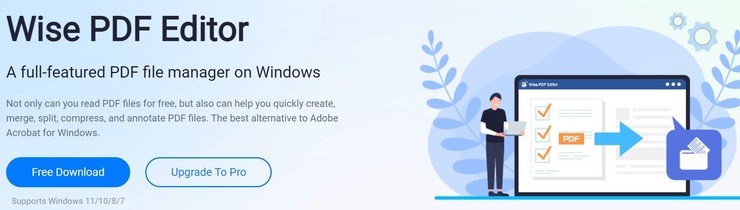
Price: Wise PDF Editor is free to use with limited capabilities. The monthly paid plan will cost you $19. Its annual plan will cost you $8.25/month. On the other hand, the perpetual license can be bought for $149.25.
With Wise PDF Editor, you get an all-in-one PDF processing tool that will allow you to just about any conceivable thing to your PDF file or document. The software can be used to create a PDF file from scratch. It also gives you all the tools you need to edit the content in your PDF file. You’ll be able to add or delete text and add links or images to your PDF in just a few clicks.
You can also add themes and modify the background of your PDF file with this image. You are also granted the ability to select and crop the PDF pages as per your needs. Besides editing, you can also depend on the software to merge or split PDF files. The software also allows you to convert a PDF file into various other formats.
Features:
- Split or Merge PDF
- Rotate PDF
- Convert PDF File
- Change PDF File Theme or Background
- Compress PDF File
Verdict: Wise PDF Editor makes it to our list because of its comprehensive range of PDF processing abilities. Besides editing, you can use the software to merge, split, compress, and convert PDF files effortlessly.
#11) Nitro Pro
Best for providing ease of use, fast speed, and high-quality OCR.
Price: Nitro is available in three pricing plans, Basic ($128 per user), Team (Get a quote), and Enterprise (Get a quote).

Nitro provides the platform to edit, convert, create, and design PDF files. You will be able to sign and share documents on the go with the help of Nitro Cloud. Its interface is similar to Microsoft Office so there will short learning curve.
Features:
- Nitro has functionalities for creating PDF from any printable format and for converting PDFs to Doc, XLS, and PPT.
- It has features for sharing and eSignature.
- This tool will provide advanced security.
- It provides features for building & filling forms, reviewing & annotating, and organizing pages.
- It provides features for sharing and storing PDF documents.
Verdict: Nitro is designed to help businesses by modernizing the daily document process. It makes 100% digital document workflows. It has a rich feature set and an intuitive interface.
#12) Foxit PhantomPDF
Best for its capability to edit PDFs everywhere.
Price: Foxit PhantomPDF offers two pricing plans, PhantomPDF Business 9 ($159) and PhantomPDF Standard 9 ($129). A free trial is available for 14 days.

PhantomPDF has powerful editor capabilities. You can change the page layout by rearranging text boxes, resizing textbooks, etc. It will allow you to add stamps, watermarks, headers, footers, bates numbers, etc. You can crop, delete, add, swap, flatten, and rotate PDF pages.
Also read =>> How to delete pages from PDF Documents
Features:
- PhantomPDF provides features and functionalities for organizing and manipulating your PDF.
- You can merge PDF documents together or split PDF apart.
- It supports dragging-and-dropping pages within a document or from one document to another.
- You can make use of popular storage sharing products.
Verdict: Foxit PhantomPDF is an RPA-Ready PDF editor. It can be integrated with leading Content Management Systems.
Website: https://www.foxitsoftware.com/pdf-editor/
#13) Nuance Power PDF
Best for offering Adobe-like functionalities at an affordable price.
Price: The price of the product starts at $89.99. Its PDF converter starts at $49.99. Nuance Power PDF Standard is available for $129.99.

Nuance Power PDF is user-friendly, budget-friendly software with advanced features. It provides all the tools and functionalities required for businesses. It is designed for making business users more productive.
Features:
- Nuance Power PDF provides the features and functionalities to annotate, markup, secure, and compress PDF.
- It also provides the functionalities for document conversion, search, connectivity, etc.
- It will allow you to create PDF files from a scanner in one click.
- It has a drag-and-drop facility to combine files and remove or replace pages.
Verdict: With Nuance Power PDF, you will be able to create PDF files instantly from any PC application that can print.
Website: https://www.nuancesoftwarestore.com/power-pdf-standard/#1531106649186-bf315552-6d63
#14) Sejda PDF Editor
Best for offering good text editing and PDF creating capabilities for free.
Price: Sejda provides three pricing plans, Web Week Pass ($5 for 7 days), Web Monthly ($7.50 per month), and Desktop+Web Annual ($5.25 per month).

Team plan pricing depends on the team size. As the team size increases, the price will get reduced. Quantity2-4 (Web Monthly Price $6.75/user/month) and (Desktop+Web Annual Price $56.70 per user/year), Quantity 5-24 (Web Monthly Price: $6 per user/month) and (Desktop+Web Annual Price: $50.40), etc.
Sejda offers a free plan of up to 200 pages or 50 MB and 3 tasks per hour.
Sejda is an online PDF editing tool. It has functionalities for editing & signing PDF files, filling PDF forms, editing text, adding text, adding images to PDF, and creating links in PDF. It allows picking PDF files from Dropbox and Google Drive.
Suggested reading =>> Best PDF to PNG Converters
Features:
- Sejda has features to annotate PDF pages.
- It provides a feature of Whiteout PDF that covers the part of the PDF page with a white rectangle so that the content is not visible for a long time.
- It will allow you to add shapes.
Verdict: Sejda allows you to save the changes to a PDF document and download the edited document.
Further Reading => A Complete Review of the UPDF PDF Editor
#15) PDFescape
Best for PDFescape is the best online PDF editing platform.
Price: PDFescape is available for free to use with files up to 10 MB and 100 pages. For the bigger file limits, you can upgrade the account. Its paid plans start at $2.99 per month.

PDFescape is the free online editor and a form filler. You can view and edit PDF files. It will allow you to create new PDF forms. It will let you upload PDFs from the PC as well as from the Internet. The platform will allow you to get the desired viewing angle by zooming in on the documents.
Features:
- PDFescape provides the functionality to annotate PDF documents.
- It provides the features to password protect the PDF files.
- It supports all popular browsers such as Chrome, Firefox, IE, Opera, and Safari.
- PDFescape can load the previously opened PDF.
Verdict: Without any installation procedure, you can use PDFescape. By upgrading the account, you will get an Ads-free platform plus features like desktop editing.
Suggested Reading => Are You Looking for the Best XML Editors
#16) iSkysoft PDF Editor
Best for its security features.
Price: iSkysoft provides a 30-days money-back guarantee. It has four pricing plans, PDFelement for Mac/Windows ($59), PDFelement Pro for Mac/Windows ($79), PDFelement PRO for Team ($109), and PDFelement Enterprise (Get a quote). All the mentioned prices are for annual billing.

PDFelement Pro by iSkysoft supports Windows and Mac platforms. It has functionalities for editing, converting, creating, and securing PDFs. You will be able to work on scanned documents. It has the capacity to extract data from forms and scanned PDFs.
Recommended read =>> Top PDF Editors for Mac platform
Features:
- iSkysoft PDF Editor provides features for adding annotations and notes to the documents.
- It has features to protect documents with passwords, redaction tools, etc.
- It can convert the PDF to various formats like Word, PPT, Excel, Pages, RTF, HTML, etc.
- You can merge multiple PDF files into a single PDF or can split a large PDF into separate files.
- iSkysoft’s PDFelement provides features of filling PDF forms, Bates Numbering, Redact PDFs, and Batch Processing.
Verdict: It will be easier to edit PDFs like a Word document. In just a few clicks, you will be able to create, fill, and sign forms with the help of iSkysoft PDF Editor. You can make scanned files editable using advanced OCR.
#17) AbleWord
Best for AbleWord is the best free Word Processor.
Price: AbleWord is free software. Even for commercial use, it can be used free of cost.

AbleWord is a word processing application that has the capacity to read and write the most popular document formats like PDFs. It is rich in features platform. It is capable of reading and writing to various file formats like Microsoft Word, Adobe PDF, Rich Text, Plain Text, and HTML.
Features:
- AbleWord will allow you to format the image.
- It supports tables and headers & footers.
- It provides functionalities like spell check and print preview.
Verdict: AbleWord is popular as a PDF editing tool. Mostly, it is used for converting PDF to Word. It provides various Microsoft Word features.
#18) PDF Expert
Best for quickly editing PDF text and images.
Price: PDF Expert is available to download for free. Its one license is for 3 Macs that will cost you $79.99.

PDF Expert is a PDF editing platform for Mac, iPhone, and iPad. It allows transferring documents seamlessly between your devices. It has functionalities for reading, annotating, and editing PDFs. You can edit text, images, and links. It has the capacity to automatically detect the font, size, and opacity of the original text.
Features:
- PDF Expert provides the features for signing contracts.
- Search indexing helps to find things instantly.
- You can save the relevant discoveries into search history.
- It provides the features for managing pages like merging files, page numbering, crop pages, and split view mode.
Verdict: The platform will help you with filling forms. PDF Expert’s advanced settings will provide a good reading experience.
#19) SmallPDF
Best for SmallPDF is best for its PDF compression capabilities.
Price: SmallPDF provides a free trial for 14 days. The price starts at $12 per month.

[image source]
Smallpdf is an online platform that has various functionalities. It can convert PDF to PPT, JPG, Word, Excel, etc. It will allow you to sign the PDF document. Smallpdf provides functionalities for compressing, merging, splitting, and rotating PDF.
Features:
- Smallpdf provides a PDF converter to convert Word, PowerPoint, and Excel files to and from PDFs.
- It has features to insert page numbers in a PDF document.
- You can protect your PDF with the help of a password and encryption.
Verdict: As per reviews, it is an extremely easy-to-use PDF editing platform that has limited functionalities
#20) EasePDF
Best for the online tools for your PDF files.
Pricing: EasePDF offers a free plan. It also offers premium membership plans i.e. Monthly Plan ($4.95 per month), and an Annual Plan ($49.95 per year).

EasePDF is an online platform for converting and editing PDFs. It is an all-in-one solution that has functionalities to edit, compress, split, merge, and rotate a PDF. It provides more than 30 tools. It is a regularly updated platform. The platform is safe to use as it performs the automatic deletion of links and files in 24 hours.
Features:
- EasePDF will let you convert word, excel, PPT, jpg, and HTML documents to PDF format.
- Similarly, you can convert PDF to Word, Excel, PPT, JPG, and HTML.
- It provides security to your documents through 256-bit SSL encryption.
- As it is an online tool, can be used on any platform like Windows, Mac, Linux, iOS, and Android.
Suggested reading =>> Apps to convert JPG to PDF for different OS
Verdict: EasePDF is a free online PDF converter. It is easy to use and eliminates the need to download and installation of the software. It provides encryption to your files. This online tool supports universal conversion and will let you convert files anytime, anywhere. It also offers premium membership plans.
#21) PDFLiner
Best for Feature-rich PDF Editing.
Price: Basic plan costs $9/month, Pro plan costs $19/month, Premium plan costs $29/month. 5-day free trial is also available.
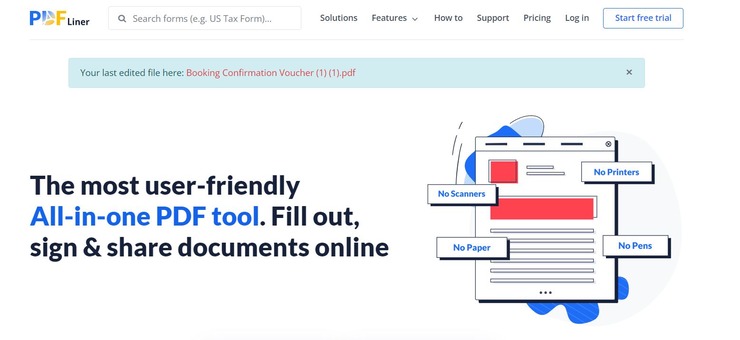
With PDFLiner, you get an online PDF editing tool that you can use to tweak a PDF document in a thousand different ways. Simply uploading a PDF document onto PDFLiner’s website will take you to an easy-to-use editing interface. Here, you will be presented with a toolbar that will allow you to perform multiple actions on your PDF.
You’ll be able to add or remove text from PDF, add or remove images from the PDF document, highlight or redact content, add a signature, or transform the entire layout design of your PDF file. Besides free editing online, you can also rely on PDFLiner to convert a PDF to JPG, split PDF, lock a PDF file, and much more.
Features:
- Annotate a PDF file
- Highlight or Redact Content
- Add Fillable Fields
- Sign a PDF file
Verdict: PDFLiner is a decent free online editor that provides you with an easy-to-use editing interface. It takes just a single click to start typing on a PDF, add images to it, or sign it using PDFLiner. If you are looking for an adequately feature-rich PDF editor that you can use for free… at least for the first 5 days, then this software is for you.
#22) WorkInTool PDF
Best for Convert, Merge and Compress PDF Files.
Price: Free to download and use for now.

With WorkInTool, you get a lot more than just a simple PDF converter. The tool is easy to use, very fast, and powerful in its converting capabilities. You can use this tool to convert PDF files into multiple formats like Powerpoint, Word, Excel, Images, etc.
Of course, that’s not all you can do with this fantastic software. You can merge, compress, or split your PDF files in a just a few quick steps. You can also use this software to add or remove watermarks from a PDF file. Moreover, the software also provides impressive security features as you can rely on WorkInTool to encrypt or password-protect your PDF documents.
Features:
- Compress PDF Files
- Convert PDF into Word, Excel, JPG, PPT, HTML, and vice versa.
- Split and Merge PDF Files
- Encrypt PDF Files
- Add or remove the watermark from PDF.
Verdict: WorkInTool is simple, powerful, and most importantly, very fast in the PDF conversion capabilities it boasts. You’ll face no issues in relying on WorkInTool to convert PDF files in multiple formats within minutes.
Now STH users can get 50% off. Use this Discoiunt Code: pdf-softwaretestinghelp
#23) PDFSimpli
Best for Converting files into multiple formats.
Price: Free

PDFSimpli is a powerful, feature-rich, and easy-to-use software that one can count on to process PDF files in a multitude of ways. Perhaps a significant aspect of this tool is its ability to quickly convert PDF files into multiple output formats and vice versa. All it takes are 3 very simple steps to get the job within minutes.
Besides file conversion, PDFSimpli is also quite exceptional at editing PDF documents. In fact, PDFSimpli, automatically re-directs you to a user-friendly PDF editing dashboard when you upload any file to it from your mobile or desktop. You can use this editor to add text or images, highlight content in the file, add a signature to the document, erase content, and much more.
Features:
- Full PDF Editing
- Convert PDF Files into multiple formats
- Compress PDF Files
- Add Digital Signature to PDF documents
Verdict: With PDFSimpli, you get a web-based PDF processor that is easy to use, feature-rich, and absolutely free to use. It is exceptional as both a PDF editor and an online platform that facilitates the seamless conversion of PDF files into multiple formats and vice versa.
#24) Xodo
Best for users who need an intuitive, reliable, and feature-rich PDF editor for any device.
Price:
- 7-day free trial available
- Monthly subscription: $12 per month
- Yearly subscription: $108 per year ($9 per month)

Xodo is an easy-to-use PDF editor widely known for its set of powerful editing capabilities. You can use it to edit PDF, fill out forms, convert, create, archive, sign and organize digital documents in your favorite browser, on Windows, Android, and iOS.
Clean and intuitive UX, unique PDF and DOCX editing features, and its competitive price point rank Xodo as one of the best PDF editors available right now.
Features:
- Add new and edit existing PDF text with custom formatting.
- Merge, split, rearrange, and delete pages from your PDF files.
- Markup content with highlights, notes and other annotations.
- Redact sensitive data or blackout entire pages in your PDFs.
- Edit DOCX files online without the need to have MS Word app.
- Compress large documents, crop pages and flatten PDF.
- Fill out PDF forms and electronically sign documents.
- Convert PDF to Word, Excel, PDF/A, HTML, and more.
- Export HEIC images into JPG, PNG, and PDF.
Verdict: Advanced set of editing tools, seamless user experience, cross-platform access, and unique DOCX editor are some of the compelling reasons to choose Xodo as your next PDF editor.
#25) DocHub
Best for: Create Fillable Templates
Price: The software is free to use. The pro version costs $14/month. You also get a 30 day free trial.

DocHub is an online platform that arms you with all the tools you need to effortlessly edit and annotate a PDF file. In just a few steps, you’ll be able to add text, images, comments, and highlights to a PDF document. You can also use the platform to convert a PDF document or merge multiple documents without compromising with the original quality.
The platform also allows you to build fillable PDF forms. It is very simple to modify fields or create new ones with this online solution. You are also presented with a plethora of fillable templates. The online platform is also perfect for signing documents. The platform allows you to typing, drawing, and uploading an image of your signature.
Features:
- PDF Editing and Annotation tools
- Document Collaboration
- Document Sharing
- Multiple Signers Workflow
- Fillable Templates
Verdict: DocHub is a feature-rich PDF editor that makes signing, sharing, or editing a form very simple. Plus, the platform also complies with industry leading standards, regulations, and certifications.
Website: https://www.dochub.com/
Conclusion
In this article, we have reviewed online PDF editors, free PDF editors, and desktop applications to provide you with a list of the best editors. Adobe Acrobat Pro DC is the overall best PDF Editing software and PDFelement is a feature-rich platform.
PDFelement, Foxit PhantomPDF, Nuance Power PDF, Nitro Pro, and Acrobat Pro DC are our top recommended PDF editing tools. Sejda, PDFescape, AbleWord, and PDF Expert offer free plans. AbleWord is completely free software, even for commercial use.
Further reading =>> Top tools to convert PDF to Word document
Also read =>> Wondershare PDFelement Review Tutorial
Review Process:
Our writers have spent 23 hours researching this topic. At first, we have shortlisted 17 tools but based on the various criteria like features, reviews, and price we have filtered the list to the top 11 tools. This will make it convenient for you to choose the right solution.
We hope this article will help you choose the right PDF Editor for your business.
Was this helpful?
Recommended Reading
-

This review compares the best online free and paid PDF Compressor tools to help you select the right tool to reduce the size of a PDF file: You must be living under a rock if you don’t know what a PDF file is in the 21st century. The PDF has…
-

Wondershare HiPDF is an all-in-one online PDF solution with AI features for PDF conversion, compression, and protection. Discover all about this highly innovative platform from this review: HiPDF is a product of Wondershare, which is a highly trusted name. Many of the industry-leading companies in the world are their clients.…
-
This tutorial reviews the desktop features of UPDF in detail. You will also get to understand the comparison of UPDF to its rival - Adobe Acrobat: Over the past few years, Portable Document Format (PDF) files have become more and more common. Because of their durability and dependability, they are…
-
This is a stepwise comprehensive guide of PDF writing tools that help to Type on a PDF File on Windows, Mac, Android, and iOS: It could be annoying to try and type on a PDF document, especially if you don’t know the right tools. Be it adding a signature, annotating,…